By popular demand, the Language Center will offer another opportunity to attend the VoiceThread Workshop: Part 2 on Friday, April 4, 2014. The session will be held from 10:10 a.m. to 12:00 p.m. in Jones 15.
The previous session of VoiceThread Part 2 went very smoothly, and the instructors who attended were able to create VoiceThread "Groups" and then a sample activity using the "Group" feature. One instructor was thrilled to be able to have her lessons and exercises made available online with VoiceThread. Another instructor commented how easy it was to incorporate a VoiceThread lesson into Moodle.
If you are interested in attending, please register in advance: http://z.umn.edu/vt3. Email Caroline Vang at cevang@umn.edu with questions about this workshop.

Showing posts with label Moodle. Show all posts
Showing posts with label Moodle. Show all posts
Monday, March 31, 2014
Monday, October 21, 2013
VoiceThread Workshop: October 25, 2013
Have you heard that VoiceThread is a new tool that's been added to Moodle? Rick Treece (Interim Coordinator of Second-Year French) and Caroline Vang (Professional Development Specialist) from the Language Center are hosting a workshop to introduce it on October 25th (Friday) from 1:25~2:15 p.m. in Jones 10. The session is open to all instructors in our language departments. We'll be showcasing sample VoiceThread projects and assignments which can be done in and outside of the classroom as well as allowing time for you to brainstorm and create your own VoiceThread assignment. Please e-mail Caroline at cevang@umn.edu if you are interested in joining us.
Thursday, April 25, 2013
German Hybrid Development: The Digital Story So Far
This is the last of a series of articles on hybrid courses. The series began with an interview with Dan Soneson, who coordinates the Hybrid Working Group, followed by a Spotlight on Spanish Hybrid Courses and La Vie Branchée: French Hybrid Classes.
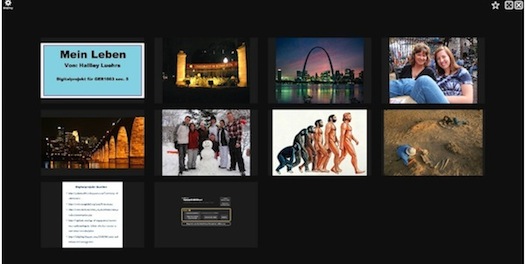
German hybrid, first offered in Fall 2012 for German 1003, is the newest of the hybrid courses currently offered at the University of Minnesota. German hybrid is unique in that it integrates new technology such as Avenue, a video recording tool, VoiceThread for digital storytelling, special Moodle tools, and Wimba Voice Board.
In the summer of 2011, Beth Kautz, a German 1003 coordinator, participated in a hybrid course in Munich about teaching hybrid language courses. "This was a transformative experience for me, which led to a year of planning before actually developing the course in the summer of 2012," Kautz said.
A small team of graduates and coordinators received a "Tools for Discovery Grant" and funding from CLA, which allowed them to create new hybrid course materials.
Kautz said German hybrid developers created their own course materials based on reading texts, podcasts, and video clips from the internet. This development allowed the German department to offer two sections of hybrid 1003 in Fall 2012, and one section of hybrid 1003 and two sections of hybrid 1004 in Spring 2013. These hybrid courses met face-to-face three days a week and online two days.
Developers experimented with different technology, including a video-recording tool developed at the University of Minnesota, called Avenue. Classrooms also integrated Moodle tools such as discussion forums, databases, glossaries, and polls, as well as the Wimba Voice Board.
Kautz said the highlight of the semester was using a tool called VoiceThread for digital storytelling. Students received instructions on using the technology. She described the project as an autobiographical essay about their youth experiences that have shaped their current educational and career goals. The student used personal photos and voice recordings to present their stories visually.
Ginny Steinhagen, German 1004 coordinator, noted that hybrid instructors are learning the benefits of spreading out deadlines for student's feedback in forums, by allowing adequate time for students to respond to each other's posts.
Steinhagen emphasized the importance of instructor feedback for online activities in hybrid courses.
Kautz added that there is great variation in how instructor feedback occurs and how students' assignments are submitted. "There are many possibilities and we are still figuring out what works best in which situation," she said.
At the moment, developers do not have specific data on student's performance comparing German hybrid and traditional face-to-face courses. Kautz noted that there are many variables to consider and considerations in terms of how to define performance. However, Kautz said, "I anticipate that students in hybrid sections will become more fluent writers through increased writing practice in online discussion boards, but that's a research project for the future."
Screenshot from a student's digital story.
German hybrid, first offered in Fall 2012 for German 1003, is the newest of the hybrid courses currently offered at the University of Minnesota. German hybrid is unique in that it integrates new technology such as Avenue, a video recording tool, VoiceThread for digital storytelling, special Moodle tools, and Wimba Voice Board.
In the summer of 2011, Beth Kautz, a German 1003 coordinator, participated in a hybrid course in Munich about teaching hybrid language courses. "This was a transformative experience for me, which led to a year of planning before actually developing the course in the summer of 2012," Kautz said.
A small team of graduates and coordinators received a "Tools for Discovery Grant" and funding from CLA, which allowed them to create new hybrid course materials.
Kautz said German hybrid developers created their own course materials based on reading texts, podcasts, and video clips from the internet. This development allowed the German department to offer two sections of hybrid 1003 in Fall 2012, and one section of hybrid 1003 and two sections of hybrid 1004 in Spring 2013. These hybrid courses met face-to-face three days a week and online two days.
New Technology
Developers experimented with different technology, including a video-recording tool developed at the University of Minnesota, called Avenue. Classrooms also integrated Moodle tools such as discussion forums, databases, glossaries, and polls, as well as the Wimba Voice Board.
Kautz said the highlight of the semester was using a tool called VoiceThread for digital storytelling. Students received instructions on using the technology. She described the project as an autobiographical essay about their youth experiences that have shaped their current educational and career goals. The student used personal photos and voice recordings to present their stories visually.
"Students focused on presentational speaking skills to make their stories engaging and easy to understand. All the digital stories were linked in a Moodle forum, where classmates could view and comment on each other's creative work... Students were able to complete the project on their own and we were all thrilled with the results! They took great pride in their stories and the sense of community was really strengthened by sharing them with each other."
- Beth Kautz, German 1003 Coordinator
Instructor Feedback and Outcomes
Ginny Steinhagen, German 1004 coordinator, noted that hybrid instructors are learning the benefits of spreading out deadlines for student's feedback in forums, by allowing adequate time for students to respond to each other's posts.
Steinhagen emphasized the importance of instructor feedback for online activities in hybrid courses.
"In 1004, [Meagan Tripp, 1004 German instructor] has created some nice, quick Moodle quizzes that show us whether the students are understanding the reading or the grammar. As teachers, it is important for us to follow up on these quizzes (even if they are self-correcting) and comment on them in class. Integrating the hybrid day activities into face to face discussions continues to be a challenge."
- Ginny Steinhagen, German 1004 Coordinator
Kautz added that there is great variation in how instructor feedback occurs and how students' assignments are submitted. "There are many possibilities and we are still figuring out what works best in which situation," she said.
At the moment, developers do not have specific data on student's performance comparing German hybrid and traditional face-to-face courses. Kautz noted that there are many variables to consider and considerations in terms of how to define performance. However, Kautz said, "I anticipate that students in hybrid sections will become more fluent writers through increased writing practice in online discussion boards, but that's a research project for the future."
Friday, January 21, 2011
iTeach Workshops and other Professional Development at the U
Language Center iTeach Workshops
This spring semester, the Language Center is creating customized iTeach Workshops for your department. If you and your colleagues are interested in improving your current use of technology, or would like to incorporate a new activity or project that uses technology into your course, the Language Center staff are here to support you! Please contact your language liaison or Alyssa Ruesch to schedule a training on the topic(s) of your choice. We are happy to conduct individual or group trainings at a time that is convenient for you.
Asian Languages and Literature: Zhen Zou
French and Italian: Rick Treece
German, Scandinavian and Dutch: Beth Kautz
Spanish and Portuguese: Pablo Viedma
Professional Development Opportunities at the U of M
University Technology Training Center
If you are new to Moodle or need a refresher, the University Technology Training Center (UTTC) offers comprehensive hands-on training. They offer 4 sessions: Creating Basic Course Web Sites, Assignments and Quizzes, Grades and Collaboration.
For more information:
http://uttc.umn.edu/training
Courses through University Libraries
The University Libraries offers a wide variety of training opportunities,ranging from presentations to help you understand the ins and outs of copyright, to productivity and collaboration tips when using Google. One session that should be useful for many language instructors is titled Can I Use That? Fair Use in Everyday Life
To register and see a complete list of courses, go to: https://www.lib.umn.edu/services/workshops/registration
Workshops through the Center for Teaching and Learning
Just in Time Teaching
The Center for Teaching and Learning offers a variety of workshops throughout the semester to help keep you and your students engaged. Re-invigorate your courses and teaching by taking one of these workshops! See http://www1.umn.edu/ohr/teachlearn/index.html for more details.
CARLA Presentations
Challenges of Teaching Pragmatics to Foreign Language Learners: The Korean Example
Tuesday, January 25
12:20-1:10 p.m.
Jones 35
Presenter: Dr. Sang-Seok Yoon
"Foreign Language Activities" in Japanese Public Elementary Schools:
A Critical Analysis of the New Language Education Policy
Tuesday, Feb 8
12:20-1:10 p.m.
Jones 35
Presenter: Sachiko Horii
Looking at Student Work to Facilitate Articulation from High School to College in Arabic and Chinese
Tuesday, Feb 22
12:20-1:10 p.m.
Jones 35
Presenters: Ursula Lentz and Gaelle Berg
The Pedagogy of Improvisation: Teaching Our Learners to Express Meaning
Wednesday, March 9
12:20-1:10 p.m.
Jones 35
Presenter: Patrick Scully
From Communicative Competence to Integrated Language and Cultural Competence:
Bridging Proficiency Levels and Disciplines
Thursday, March 24
12:00-1:00 p.m. (note time difference)
Jones 15
Presenter: Patricia Mougel
Heritage Speakers of Less Commonly Taught Languages (LCTL) in the United States
Wednesday, April 6
12:20-1:10 p.m.
Jones 35
Presenter: Vichet Chhuon
Deconstructing ESL: Exploring the Consequences of an Institutional Category
Wednesday, April 20
12:20-1:10 p.m.
Jones 35
Presenter: Adam Rambow
This spring semester, the Language Center is creating customized iTeach Workshops for your department. If you and your colleagues are interested in improving your current use of technology, or would like to incorporate a new activity or project that uses technology into your course, the Language Center staff are here to support you! Please contact your language liaison or Alyssa Ruesch to schedule a training on the topic(s) of your choice. We are happy to conduct individual or group trainings at a time that is convenient for you.
Asian Languages and Literature: Zhen Zou
French and Italian: Rick Treece
German, Scandinavian and Dutch: Beth Kautz
Spanish and Portuguese: Pablo Viedma
Professional Development Opportunities at the U of M
University Technology Training Center
If you are new to Moodle or need a refresher, the University Technology Training Center (UTTC) offers comprehensive hands-on training. They offer 4 sessions: Creating Basic Course Web Sites, Assignments and Quizzes, Grades and Collaboration.
For more information:
http://uttc.umn.edu/training
Courses through University Libraries
The University Libraries offers a wide variety of training opportunities,ranging from presentations to help you understand the ins and outs of copyright, to productivity and collaboration tips when using Google. One session that should be useful for many language instructors is titled Can I Use That? Fair Use in Everyday Life
To register and see a complete list of courses, go to: https://www.lib.umn.edu/services/workshops/registration
Workshops through the Center for Teaching and Learning
Just in Time Teaching
The Center for Teaching and Learning offers a variety of workshops throughout the semester to help keep you and your students engaged. Re-invigorate your courses and teaching by taking one of these workshops! See http://www1.umn.edu/ohr/teachlearn/index.html for more details.
CARLA Presentations
Challenges of Teaching Pragmatics to Foreign Language Learners: The Korean Example
Tuesday, January 25
12:20-1:10 p.m.
Jones 35
Presenter: Dr. Sang-Seok Yoon
"Foreign Language Activities" in Japanese Public Elementary Schools:
A Critical Analysis of the New Language Education Policy
Tuesday, Feb 8
12:20-1:10 p.m.
Jones 35
Presenter: Sachiko Horii
Looking at Student Work to Facilitate Articulation from High School to College in Arabic and Chinese
Tuesday, Feb 22
12:20-1:10 p.m.
Jones 35
Presenters: Ursula Lentz and Gaelle Berg
The Pedagogy of Improvisation: Teaching Our Learners to Express Meaning
Wednesday, March 9
12:20-1:10 p.m.
Jones 35
Presenter: Patrick Scully
From Communicative Competence to Integrated Language and Cultural Competence:
Bridging Proficiency Levels and Disciplines
Thursday, March 24
12:00-1:00 p.m. (note time difference)
Jones 15
Presenter: Patricia Mougel
Heritage Speakers of Less Commonly Taught Languages (LCTL) in the United States
Wednesday, April 6
12:20-1:10 p.m.
Jones 35
Presenter: Vichet Chhuon
Deconstructing ESL: Exploring the Consequences of an Institutional Category
Wednesday, April 20
12:20-1:10 p.m.
Jones 35
Presenter: Adam Rambow
Thursday, October 22, 2009
Technology Tips to Prepare for H1N1
We are offering some quick tips for instructors to use technology to minimize the negative impact of H1N1, whether it affects 1 or 2 students or a large number of students.
1. If you are not using any course management system yet, this should be a good time for you start using one. A course management system, such as Moodle and WebVista, offers convenient tools for instructors to communicate with students, to distribute course content, and to conduct class activities online. The University supports both the WebVista and Moodle course management systems. To request to have a site set up for your class, go to http://webvista.umn.edu/forms/request-site.shtml for WebVista, or http://www1.umn.edu/moodle/instructor/request.html for Moodle.
2. Use Netfiles. Netfiles is a file-storage resource with collaboration and sharing features. With Netfiles, you can upload class-related files and share them with colleagues and students. Current UMN Staff, Faculty and Students are eligible for a NetFiles account. To activate your account, go to your internet account options page at https://www.umn.edu/myaccount.
3. Use iTunes U to distribute audio and video content to students in the form of a podcast. iTunes U provides both restricted and public access to educational content and makes the distribution of audio, video or pdf files to your students an easy task. To sign up for an account, go to http://itunes.umn.edu/
4. Use the Digital Content Library to deliver copyrighted movies and other audio/video content. To find out more information and to submit content, go to http://dcl.umn.edu/
Other tools that we recommend include Media Mill and Media Magnet for creating, managing and distributing media content, and Camtasia Relay for capturing your class. Please contact the Language Center for help if you are interested in using these tools.
Stay healthy!
1. If you are not using any course management system yet, this should be a good time for you start using one. A course management system, such as Moodle and WebVista, offers convenient tools for instructors to communicate with students, to distribute course content, and to conduct class activities online. The University supports both the WebVista and Moodle course management systems. To request to have a site set up for your class, go to http://webvista.umn.edu/forms/request-site.shtml for WebVista, or http://www1.umn.edu/moodle/instructor/request.html for Moodle.
2. Use Netfiles. Netfiles is a file-storage resource with collaboration and sharing features. With Netfiles, you can upload class-related files and share them with colleagues and students. Current UMN Staff, Faculty and Students are eligible for a NetFiles account. To activate your account, go to your internet account options page at https://www.umn.edu/myaccount.
3. Use iTunes U to distribute audio and video content to students in the form of a podcast. iTunes U provides both restricted and public access to educational content and makes the distribution of audio, video or pdf files to your students an easy task. To sign up for an account, go to http://itunes.umn.edu/
4. Use the Digital Content Library to deliver copyrighted movies and other audio/video content. To find out more information and to submit content, go to http://dcl.umn.edu/
Other tools that we recommend include Media Mill and Media Magnet for creating, managing and distributing media content, and Camtasia Relay for capturing your class. Please contact the Language Center for help if you are interested in using these tools.
Stay healthy!
Subscribe to:
Posts (Atom)