Go to the U of M home page
Showing posts with label authentic materials. Show all posts

Monday, February 24, 2014

Multilingual TV in the Multimedia Lab

The Multimedia Lab in Jones 135 streams multilingual international TV Monday through Friday in the following languages:

  • Arabic: Al-Jazeera (news), BBC (news)
  • Chinese: CCTV-4 (news)
  • Dutch: RTV N-H (variety)
  • Finnish: Stadi TV (variety)
  • French: TV5 (news)
  • German: NDR (variety)
  • Hebrew: Reshet TV (news)
  • Italian: TVA Vicenza (variety), RAI (news)
  • Japanese: NHK (news)
  • Korean: KTV - Korean National Visual Media and Publishing Center
  • Norwegian: TV Haugaland (news)
  • Portuguese: Programa do Jô
  • Russian: Vesti (News)
  • Spanish: Telesur (news), RTVE (news), Telemadrid (news)
  • Swedish: Aktuellt (News)

Students can watch TV on the wall-mounted large-screen monitor and listen through wireless headphones while relaxing on the Lab's spacious and comfortable couch or lounge chairs. The viewing schedule is available online.

Please inform your students of this fun, authentic, and relaxing language learning opportunity. Instructors can even incorporate the viewing of particular programs into the curriculum.

Monday, September 23, 2013

Multilingual TV in the Multimedia Lab

The Multimedia Lab in Jones 135 streams multilingual international TV in many of the languages taught at the University, including: Arabic, Chinese, Dutch, Finnish, French, German, Hebrew, Italian, Japanese, Korean, Norwegian, Portuguese, Russian, Spanish, and Swedish. Students can watch TV on the wall-mounted large-screen monitor and listen through wireless headphones while relaxing on the Lab's spacious and comfortable couch or lounge chairs. The viewing schedule is available online.

Please inform your students of this fun, authentic, and relaxing language learning opportunity.


Tuesday, February 5, 2013

Satellite TV in Multimedia Lab Now Includes Hebrew

The Multimedia Lab in Jones 135 now offers a wider variety of languages on our multilingual international TV. Students can watch TV on the wall-mounted large-screen monitor and listen through wireless headphones while relaxing on the Lab's spacious and comfortable couch or lounge chairs.

Please inform your students of this fun, authentic and relaxing language learning opportunity. The schedule is available online.

Wednesday, November 21, 2012

Annotated Film Clips Now Available

Using authentic video in language teaching has always been an engaging, enriching, and pedagogically sound use of technology. Now thanks to the University of Minnesota's participation in a UC-Berkeley library initiative, it's even quick and easy too!

Playing short film clips in the second-language classroom or sharing them outside of class can be a simple and efficient way to demonstrate a linguistic function, introduce new vocabulary, show a cultural setting and much more! Short clips allow an instructor to get immediately to the relevant point and watching an interesting clip from a target language film can be culturally enriching for students.

Unfortunately, anyone who has ever located and digitized film clips for class will attest that this work can be labor-intensive. Either the clips need to be prepared well in advance of a class or you cannot use them at all.

The Language Center, on behalf of the College of Liberal Arts is proud to introduce a new resource for University of Minnesota language, culture and film instructors. Our university is now one of several participants in the Berkeley Language Center's Library of Foreign Language Film Clips (LFLFC). This web-based collection features high quality tagged and structured clips from a wide-range of foreign language films. Many clips offer optional subtitles.

Films with tagged clips are currently available in the following target languages: Arabic, Chinese, Finnish, French, German, Hindi, Italian, Japanese, Korean, Norwegian, Polish, Portuguese, Russian and Spanish. If your language is not available, check back! New content is constantly being added. Films in the library include classic and modern films such as Raise the Red Lantern, Caché, Xala, Bella Martha, City of God, Burnt by the Sun and Y Tu Mamá También. Berkeley does not provide a public list of all films available through the LFLFC, but clips are available from close to 350 feature films. The number of clips per film varies considerably, but for most films there are more than ten individual clips available.

Because the database is searchable by both keyword and target-language vocabulary, an instructor can quickly select clips based on the particular instructional topic of the day and play or share an existing annotated clip. For instance, a French instructor looking for examples of introductions can choose from thirty-seven clips. A good choice to consider might be the clip named "Introductions" from Entre les Murs, which has the description "Old and new faculty introduce themselves in a summer meeting prior to the start of classes." The work to find the right video clip is almost done before you've even hit play on a single film.

Some clips even come complete with educational materials. Instructors can also upload and share their own lesson plans for particular clips.

Since the U of M is now a participating university in the LFLFC, all U of M language and culture instructors now have access to these tagged and structured clips for their own classes. There is a catch: in accordance with U.S. copyright law, U of M instructors only have access to those clips in the LFLFC from films for which a university department at the U of M has purchased a physical DVD. This means that instructors can access films owned by the Language Center, CSCL, the Smart Learning Commons and the East Asian Library. Instructors who register with the LFLFC will only see those film choices. As other films in the LFLFC are purchased by university departments, they will be added to the options available for university instructors.

Film clips that instructors request are available for up to two weeks. Instructors can "reserve" the same film clip more than once, so it is possible to use a clip several times.

There is a two-step process to access the LFLFC: first apply for an account at the Berkeley site, second, email elsie@umn.edu and request approval of your application. You must register both with Berkeley and with the Language Center. The sooner you sign up, the sooner you can begin easily integrating short film clips into your class!


Tuesday, November 6, 2012

World Languages Day International Music Playlist

Have a favorite non-English language song? Now's your chance to share it! The World Languages Day team is currently working on an international music playlist for the event. Music will play while students are waiting for the welcoming remarks and at other transitional times. We are looking for songs that are in a second language, and are modern, upbeat, interesting and relatively short (less than five minutes). The lyrics should be in a language other than English and appropriate for high school students. In particular, we are looking for additional song suggestions for Arabic, Dutch, Italian, Japanese, Korean, Norwegian and Russian, but all ideas will be considered. Please email wld@umn.edu with the name of the song, artist, language and purchasing information. All songs must be available for digital purchase in the United States.

Monday, January 23, 2012

Multilingual TV in the Multimedia Lab

The Multimedia Lab in Jones 135 now offers multilingual TV programming. Every day, Lab patrons can watch a variety of live streaming channels from around the globe on the Lab's big-screen television and listen through wireless headphones. Instructors: Be sure to tell your language students about this venue for real-time, authentic language learning.

Our TV schedule is available online.

In addition, the French TV station TV5 is available for viewing every day.


Monday, December 5, 2011

Choosing a language podcast

Millions of podcasts are available through iTunes for language learners. With so many options, it can be difficult to find a good podcast, but by searching the right way you will easily find the podcast that suits your language-learning needs.

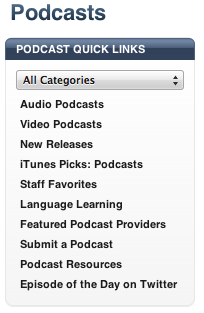
Beginner -- Go to iTunes Store/Podcasts. Click on Language Learning under Quick Links on the navigation bar on the right-hand side of the Podcasts page (Figure 1). Search for podcasts in the language of your choice. Most of these podcasts are instructional and suited for beginner to intermediate students.

Fig. 1
Figure 1.


Intermediate -- You can also find podcasts in your target language by doing a Power Search. Go to iTunes Store/Podcasts, and access Power Search either under Quick Links in the upper right-hand corner of the iTunes Store homepage or on the upper left of any store search results page (Figure 2). Then search for podcasts in the language of your choice. Your search will return only the podcasts in the target language. Some of these will be instructional, and some will not.

Fig. 2
Figure 2.

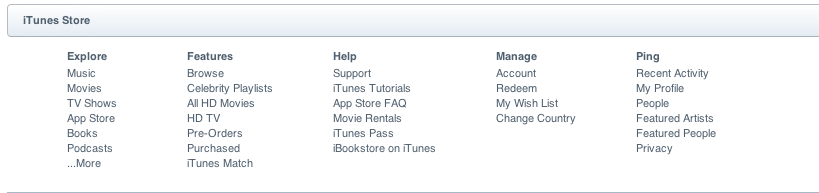
Advanced -- Go to iTunes Store/Home/Manage/Change country (on the bottom of the screen Figure 3); select the country of your choice. When this feature is enabled, iTunes will reflect the options for the country you've selected. Be ready! The language on the page will also automatically switch to the language of the country you've selected, too. Now when you click on Podcasts, you will find a huge array of content-based options, all in the language(s) of the country you've chosen.

Fig. 3
Figure 3.

Once you have found podcasts you enjoy, you can click on Subscribe to receive regular updates of these podcasts, which you can download onto your iPod or iPhone, and listen and learn on the go.

Tuesday, April 12, 2011

Funding opportunity for LCTL materials purchase

Limited funds are now available for the purchase of materials to enhance the teaching and learning of Less Commonly Taught Languages (all those taught here at the University with the exception of Spanish, French, and German). The funding source is the Title VI Grant managed by the Global Studies Institute. This year the Language Center is managing the distribution of these funds.

CLA language instructors may request funds to purchase materials to support the learning of their language. While the funds may reach to support a number of smaller purchase, the total amount for each language may not exceed $500. Please submit an application for each item you wish to purchase with these funds. The application deadline is Monday, May 2, 2011. For the best opportunity of receiving funds, please provide as much information as possible about the materials you would like to purchase, how they will be used and shared, and how they will enhance the learning of your language.

You can apply online

Tuesday, March 29, 2011

Shorten YouTube videos with TubeChop

Have you ever wanted to show just a short portion of a YouTube video? Perhaps you'd like to do an information gap activity in your class where groups of students would watch different portions of a YouTube video and then explain the beginning and ending of the video to each other. Or maybe you just want to be able to quickly bring up the relevant portion of a video, rather than waiting for the entire video to load.

In either case, it can be pretty handy to have only the portion of the video you need.  Enter TubeChop!  Just go to the TubeChop site,
enter the URL of the YouTube video you want to shorten, select the start
and end points and then chop! Voila! You have a shortened YouTube
video!

After chopping your video, you can embed or link to it from your course website or blog. Here's an excerpt of a video Language as a Window Into Human Nature by RSAnimate that I chopped in TubeChop:

 
For more information about TubeChop, see TubeChop: The Educative Use of YouTube at the Educational Technology blog.


Friday, January 28, 2011

Fasten Seat Belts: Quick videos to learn about cultural differences

Are you looking for a quick, cultural conversation starter for your class? Consider playing one of the videos found on Fasten Seat Belts. These online videos, which range from 20 seconds to a little over a minute long, provide some quick tips and expressions about cultural differences for some countries in Europe and Asia. Here is a sample video about table manners:


In addition to these short videos, there are audio clips that cover some basic expressions such as hello, good-bye, and numbers.

The audio and videos on this site were funded by the European Commission's Socrates-Lingua department and by the European Commission's Life Long Learning Programme in an effort highlight cultural differences and break cultural and linguistic barriers.

Thanks to Ryan at Language Lab Unleased! and Richard Byrne at Free Technology for Teachers for the tip!