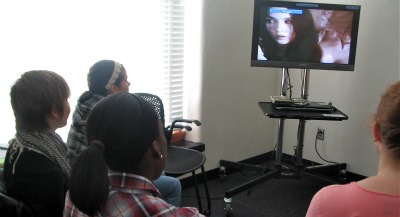
 Remind your students that Jones Room 135B is great for group work. Students can view movies at the same time, work on their projects together rather than individually at different computers, and talk freely. This room is also equipped with a Mac and PC, and a digital Marantz recorder.
Friday, October 15, 2010
Flat-screen viewing area
Interested in having students view a rare film in your language of study, but don't have the class time? Reserve the movie from the Language Center main office, and recommend students watch it with small groups in Jones 135B, where they can enjoy privacy and high definition viewing on our large flat-screen TV.
Remind your students that Jones Room 135B is great for group work. Students can view movies at the same time, work on their projects together rather than individually at different computers, and talk freely. This room is also equipped with a Mac and PC, and a digital Marantz recorder.
Remind your students that Jones Room 135B is great for group work. Students can view movies at the same time, work on their projects together rather than individually at different computers, and talk freely. This room is also equipped with a Mac and PC, and a digital Marantz recorder.Friday, September 24, 2010
Free trial to yabla
The Language Center has acquired a 60-day free trial of an internet-based video service called yabla. We should have enough licenses (Spanish = 2000, French = 1000, German = 500) to accommodate everyone (instructors and students) who wants to try it out. The product also exists for ESL, but we don't have a trial to use that.
The main pedagogical application would be listening comprehension, with some pertinence for culture, vocabulary enrichment and even reading. The site offers short, authentic videos with target-language transcription and English translation, both of which can be hidden at will. There's a built-in bilingual dictionary, a slow-play feature and even a fill-in-the-blank "game". If students click on words in the transcription, the site will create customized flashcards of those words for later review.
The videos are rated according to difficulty. Most seem to be in the 2 or 3 out of 5 range, hence accessible to ambitious second-year students. There is also an index by subject area: art/culture, documentary, environment, food, etc. In addition, the site has ready-made lessons for Spanish and French that focus on particular elements of grammar, vocabulary or even pronunciation: se impersonal, ‹h› aspiré, etc.
Using our free account unfortunately involves two steps the first time. First you have to request access. Go to the yabla page you want:
French http://french.yabla.com
German http://german.yabla.com
Spanish http://lomastv.com
Scroll to the bottom of the page and click Sign up for Students
Scroll down to MN and choose University of Minnesota
Click Continue to Sign-up » and complete the form.
After your request has been approved, you should be able to log in with your Email and Password. I'll try to keep on top of the approvals so that you don't have more than a day to wait for access, since the clock is ticking: our account expires November 23!
The main pedagogical application would be listening comprehension, with some pertinence for culture, vocabulary enrichment and even reading. The site offers short, authentic videos with target-language transcription and English translation, both of which can be hidden at will. There's a built-in bilingual dictionary, a slow-play feature and even a fill-in-the-blank "game". If students click on words in the transcription, the site will create customized flashcards of those words for later review.
The videos are rated according to difficulty. Most seem to be in the 2 or 3 out of 5 range, hence accessible to ambitious second-year students. There is also an index by subject area: art/culture, documentary, environment, food, etc. In addition, the site has ready-made lessons for Spanish and French that focus on particular elements of grammar, vocabulary or even pronunciation: se impersonal, ‹h› aspiré, etc.
Using our free account unfortunately involves two steps the first time. First you have to request access. Go to the yabla page you want:
French http://french.yabla.com
German http://german.yabla.com
Spanish http://lomastv.com
Scroll to the bottom of the page and click Sign up for Students
Scroll down to MN and choose University of Minnesota
Click Continue to Sign-up » and complete the form.
After your request has been approved, you should be able to log in with your Email and Password. I'll try to keep on top of the approvals so that you don't have more than a day to wait for access, since the clock is ticking: our account expires November 23!
Wednesday, September 8, 2010
From the Director, Fall 2010
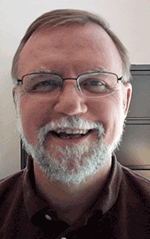
As students repopulate our campus with the onset of a new semester, the Language Center continues to evolve to support the teaching and learning of languages at the University. As you walk through Jones Hall, you will notice quite a bit of activity and some significant changes this semester.
A New Classroom
In response to increasing class sizes we have remodeled Jones 15. We have replaced the rows of booths with a more open floor plan, placing tables along the perimeter of the room and two islands of tables in the center. We have effectively divided the space into quadrants. This way, we can accommodate up to 28 students simultaneously, working individually on brand new iMac computers, or convening either in small groups or four medium groups to work collaboratively on tasks. In addition to the new floor plan, we have also installed a new instructor desk that includes the standard equipment - iMac computer with MacDiLL software, video and audio players, as well as a document camera. In design, the remodeled classroom resembles our most popular classroom, Jones 30, with its open and accessible floor plan. Please come by to take a look and book your class in the new space. Let us know what you think!
TandemPlus / Multimedia Lab Coordinator
We also welcome a new staff member this semester. Kate Clements has joined us to serve as both the Coordinator for the Multimedia Lab (Jones 135) as well as the Coordinator for the TandemPlus program. Kate is no stranger to the technology available at the University and in the Language Center. While earning an MA in the ESL program here at the University, she served as the IT Fellow for the Department of Spanish and Portuguese. In addition to assisting individual instructors, she spearheaded the transition of Spanish language courses from WebCT Vista to the Moodle course management system. Since receiving her degree, she has taught in the Minnesota English Language Program, often meeting with her classes in the computer classrooms in Jones Hall. She has shared some of her experiences with technology by presenting several workshops in the Language Center's iTeach workshop series. Her involvement with the TandemPlus program includes participating as a student with a native Spanish speaker in the Face-to-Face program, as well as recommending her students in the MELP program to participate in order to develop their English conversational skills. We are delighted to have Kate with us. Please welcome her to the Language Center.
Testing Program Grant
Our Testing program has received funding as a part of the Title VI grant administered by the Institute for Global Studies to develop new Language Proficiency Tests. Overseen by Monica Frahm, the project is directed by Gabriela Sweet who brings many years of test development and administration to the task. Their group is in the process of developing test items for Italian, Russian, Chinese, Japanese, and a second exam in Spanish. Temporarily located in Jones 110F, they are working at a fever pitch to produce these materials by the middle of November.
CLA-OIT Support
The CLA IT Fellows program has also undergone changes this fall. While previously the program provided up to 20 graduate fellows who were assigned to specific departments to help instructors with technology issues, the program will now rely on 15 undergraduate students to perform work such as developing Moodle sites for courses and working with multimedia. Instructors will work directly with 5 graduate students to develop concepts, who will then pass on the construction responsibilities to the undergraduate students. All language departments and the Language Center will be served by one person now, and we are extremely fortunate that the program has hired Lindsey Lahr to be the contact person for our area. Lindsey has been the IT Fellow for the Language Center and the Department of Asian Languages and Literature for the past two years. She has been working in our Development Studio in Jones 127 and helping instructors to digitize a variety of media as well as to make and edit professional level audio recordings. She will now work through the CLA-OIT office. If you have a request for Lindsey, the best way to contact her is through the CLA Help Desk. You can send an email to help@cla.umn.edu or call 4-HELP.
As the relatively new Director of the Language Center I am delighted to be working here at the University of Minnesota with such a dedicated staff and with such excellent facilities and support. Our mission is to promote and support the teaching and learning of world languages. Technology is an excellent tool to accomplish this mission. Our state-of-the-art facilities and equipment provide both access to information as well as tools to help students complete interesting and engaging multimedia projects. Our staff is extremely knowledgable about the possibilities of technology and continues to explore a wide variety of emerging technological applications that connect students with authentic materials and cultures, and with speakers of the languages that students are learning. We support students and instructors with technology assistance, and we also serve as a place for exploring the nature of language and second language acquisition itself. I encourage you to take advantage of the opportunities that the Language Center offers.
Wishing you all the best for a successful and productive fall semester,
Dan Soneson
Thursday, August 19, 2010
Language Center Classrooms - Policies and Tips
The following policies and tips will help keep your second-language class running smoothly.
When using a Language Center classroom, please remember:
Saving Files - All files are deleted nightly!
Keep in mind that all Language Center classroom and lab computers are public computers and that all files may be viewed, edited or deleted by other users. For this reason, and for your protection, we delete all files at the end of each day. There are two places where you can temporarily save your files while you work:
Local_Save: Files saved here are only accessible from the computer at which you work.
LC-Server: Files saved here are accessible from most computers in the Language Center.
**We highly encourage you and your students to use external media such as a USB flash drive or networked storage space like Netfiles to save your files.
Printing
Videotaping
The Language Center can video record classes onto VHS tapes, DVD+R or DVD-R discs. Instructors must provide their own media for the recording.
If the video recording will be shown publicly after the class or presentation, all video recorded participants should grant permission for the recording. Participants can grant permission by completing the Videotaping Permission Form found at: http://languagecenter.cla.umn.edu/downloads/lcforms/videoPermission.pdf
Software Installation Requests
All classrooms include the following software: Microsoft Office Suite (Word, Excel, Powerpoint), Audacity, Hot Potatoes, and Firefox. In addition to these programs, the three Mac Classrooms (10, 15 and 30) include: Mac DiLL, Safari, iLife (iMovie, PhotoBooth, GarageBand) and Parallels for operating Windows on a Mac.
If you need a special program or a plug-in installed prior to your class, you will need to complete a software installation request form. Download from:
http://languagecenter.cla.umn.edu/downloads/lcforms/swinstall.pdf
Please be aware that:
Training
The more comfortable you are with technology, the smoother your classes will go. For individual or small-group hands-on training, complete an online reservation request form for the room you are using and indicate on the form that you would like training. If you have questions about how much training you need, contact Alyssa Ruesch rues0022@umn.edu
For more information on how to use the software installed in the Language Center classrooms, such as the Mac DiLL or Apple Remote Desktop, check out our online guides at http://jonesclassroomguides.pbworks.com
The Language Center sponsors a variety of presentations and hands-on workshops on how to make effective use of technology in the classroom. For a list of upcoming events, see http://iteachworkshop.pbworks.com
Consider subscribing to this blog for Language Center related updates and tips on how to make effective use of technology.
Classroom Reservations
To use Language Center classrooms, you must intend to use technology. To make a reservation, go to http://languagecenter.cla.umn.edu/reserve
When using a Language Center classroom, please remember:
- No food or drink allowed!
- Please keep audio volume in your classrooms at reasonable levels.
- Please collect your materials at the end of class. The Lost and Found is upstairs in the Main Office Jones 110.
- All classroom activities may be monitored: Rooms 30 & 35 can be videotaped, Apple Remote Desktop software used to maintain the Mac computers can remotely display classroom desktops from Rooms 10, 15 and 30
- If you cannot attend your reservation, please notify the LC of your cancellation. Repeat no-shows maybe negatively impact your ability to reserve rooms in the future.
Saving Files - All files are deleted nightly!
Keep in mind that all Language Center classroom and lab computers are public computers and that all files may be viewed, edited or deleted by other users. For this reason, and for your protection, we delete all files at the end of each day. There are two places where you can temporarily save your files while you work:
Local_Save: Files saved here are only accessible from the computer at which you work.
LC-Server: Files saved here are accessible from most computers in the Language Center.
**We highly encourage you and your students to use external media such as a USB flash drive or networked storage space like Netfiles to save your files.
Printing
- Printing is available for in-class activities in all of the classrooms. Prints will be sent to a printer in Room 5.
- Printing is only allowed for in-class activities
- Does NOT include class handouts and student essays written before class.
- Printing is limited to 3 pages per student per class session.
- Instructors must pick up all prints from Room 5. Students are not allowed to pick up prints from Room 5.
- Note that if you are printing from the Laptop Lab, you will first need to connect to the Internet.
Videotaping
The Language Center can video record classes onto VHS tapes, DVD+R or DVD-R discs. Instructors must provide their own media for the recording.
If the video recording will be shown publicly after the class or presentation, all video recorded participants should grant permission for the recording. Participants can grant permission by completing the Videotaping Permission Form found at: http://languagecenter.cla.umn.edu/downloads/lcforms/videoPermission.pdf
Software Installation Requests
All classrooms include the following software: Microsoft Office Suite (Word, Excel, Powerpoint), Audacity, Hot Potatoes, and Firefox. In addition to these programs, the three Mac Classrooms (10, 15 and 30) include: Mac DiLL, Safari, iLife (iMovie, PhotoBooth, GarageBand) and Parallels for operating Windows on a Mac.
If you need a special program or a plug-in installed prior to your class, you will need to complete a software installation request form. Download from:
http://languagecenter.cla.umn.edu/downloads/lcforms/swinstall.pdf
Please be aware that:
- We require at least 2 weeks notice prior to installation.
- We cannot make copies of copyrighted material without express written consent of the copyright owner. You are responsible for showing proof of licensing appropriate for the number of installations requested.
- We reserve the right to not install software that is incompatible with our systems or may pose a threat to our equipment or users.
- You are responsible for arranging a time to test the installed software to ensure that it meets your specific classroom needs.
Training
The more comfortable you are with technology, the smoother your classes will go. For individual or small-group hands-on training, complete an online reservation request form for the room you are using and indicate on the form that you would like training. If you have questions about how much training you need, contact Alyssa Ruesch rues0022@umn.edu
For more information on how to use the software installed in the Language Center classrooms, such as the Mac DiLL or Apple Remote Desktop, check out our online guides at http://jonesclassroomguides.pbworks.com
The Language Center sponsors a variety of presentations and hands-on workshops on how to make effective use of technology in the classroom. For a list of upcoming events, see http://iteachworkshop.pbworks.com
Consider subscribing to this blog for Language Center related updates and tips on how to make effective use of technology.
Classroom Reservations
To use Language Center classrooms, you must intend to use technology. To make a reservation, go to http://languagecenter.cla.umn.edu/reserve
Tuesday, May 11, 2010
Conversations in the Language Center: World Languages Day!
The Language Center is starting a new audio podcast series titled Conversations in the Language Center. We will be presenting and discussing a variety of topics revolving around the Language Center including technology in the foreign language curriculum, languages across the curriculum, opportunities for speaking languages with partners from other cultures, and initiatives of the Language Center highlighting center staff and programs.
Our first episode focuses on World Languages Day, which this year is May 18th. Listen to these conversations:
Stay tuned as Alyssa Ruesch tells us about the latest news and events at the Language Center. This podcast is hosted by the Language Center Director, Dan Soneson.
Listen to Episode 1 of LC Podcast - World Languages Day
Our first episode focuses on World Languages Day, which this year is May 18th. Listen to these conversations:
- Stephanie Treat the World Languages Day Coordinator interviewed by Zhen Zou, Educational Specialist at the Language Center on WLD planning
- Rick Treece, a past instructor on World Languages Day, talking with the Language Center's Technical Coordinator, Diane Rackowski
- Teran Pederson, a current University student who is working on planning WLD this year and is a past student participant talking to the Language Center's IT Fellow, Lindsey Lahr
Stay tuned as Alyssa Ruesch tells us about the latest news and events at the Language Center. This podcast is hosted by the Language Center Director, Dan Soneson.
Listen to Episode 1 of LC Podcast - World Languages Day
Subscribe to:
Posts (Atom)